---
title: Connect to WVD from Anywhere
description: After you deploy WVD, use the links below to download the remote desktop client for your device to connect to WVD. Use the native client for your OS instea
image: https://infusedinnovations.com/hubfs/Imported_Blog_Media/IMG_0008-2.png
---

[Technology Architecture & Delivery](https://infusedinnovations.com/blog/tag/technology-architecture-delivery)

# Connect to WVD from Anywhere

by [Dan Chemistruck](https://infusedinnovations.com/blog/author/dan-chemistruck)

 2 min read

 October 2, 2019

After you [deploy WVD](https://infusedinnovations.com/blog/intelligent-cloud/step-by-step-guide-to-deploy-windows-virtual-desktop-in-azure), use the links below to download the remote desktop client for your device to connect to WVD. Use the native client for your OS instead of the browser for multi-monitor support.


#### [Browser](https://rdweb.wvd.microsoft.com/arm/webclient/index.html)

#### [Windows 10](https://go.microsoft.com/fwlink/?linkid=2068602)

#### [MacOS](https://apps.apple.com/us/app/microsoft-remote-desktop-10/id1295203466?mt=12)

#### [IOS / iPadOS](https://apps.apple.com/us/app/microsoft-remote-desktop/id714464092)

#### [Android](https://play.google.com/store/apps/details?id=com.microsoft.rdc.android.beta&hl=en_US)

Connect to your WVD instance from anywhere, on any device.

## iPad Pro is a Great Thin Client to Connect to WVD

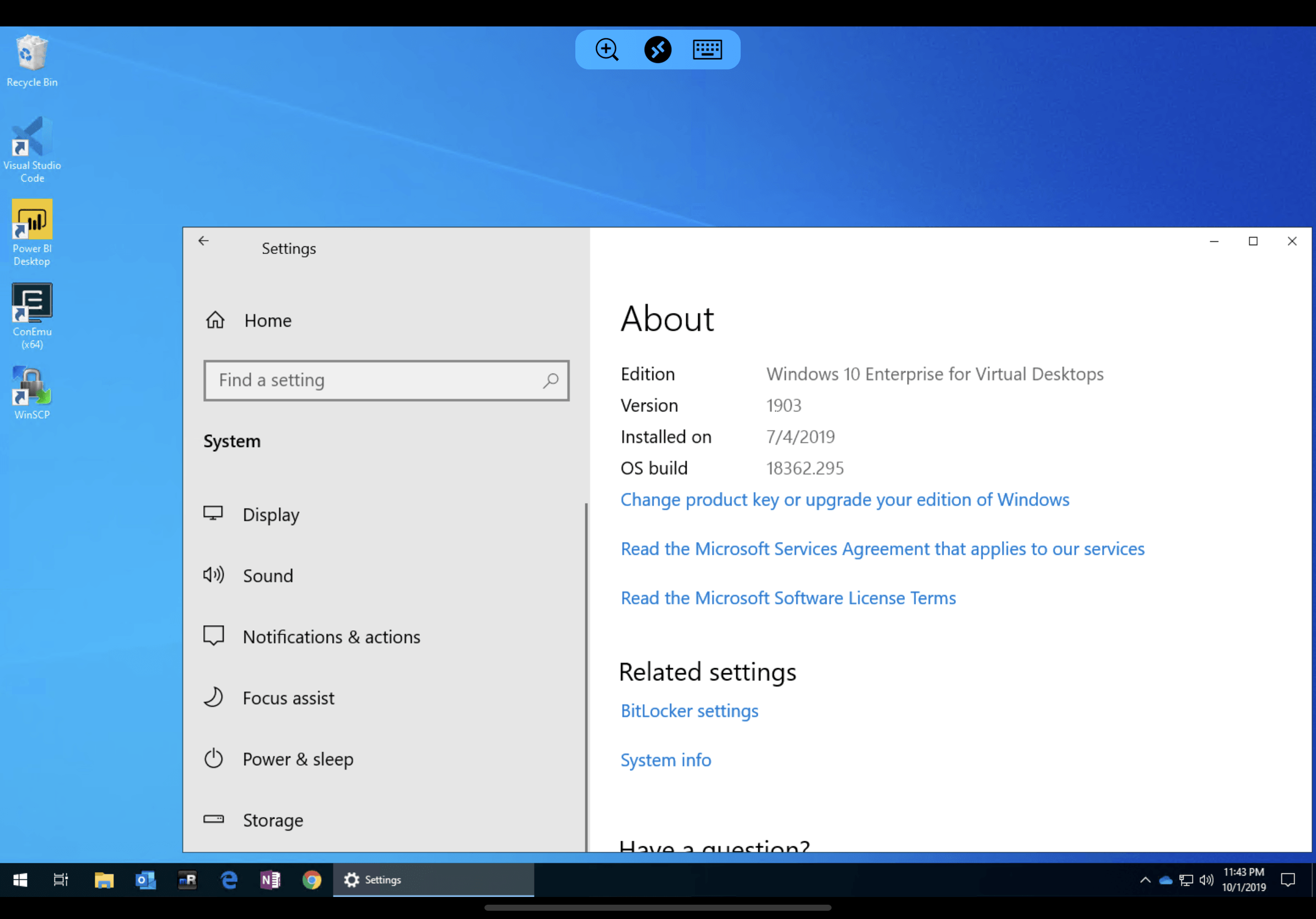
Don't get me wrong, I love the Surface line of computers and I use a Dell Precision laptop as my everyday machine. But when I'm on vacation, I don't want to lug around my work PC just in case there's an emergency. Or deal with DPI scaling issues when I undock my laptop. The latest iPadOS update lets me use a Bluetooth mouse on a lightweight device with a gorgeous display that gives me *my* full Windows 10 desktop running on WVD.

Time needed: 5 minutes.

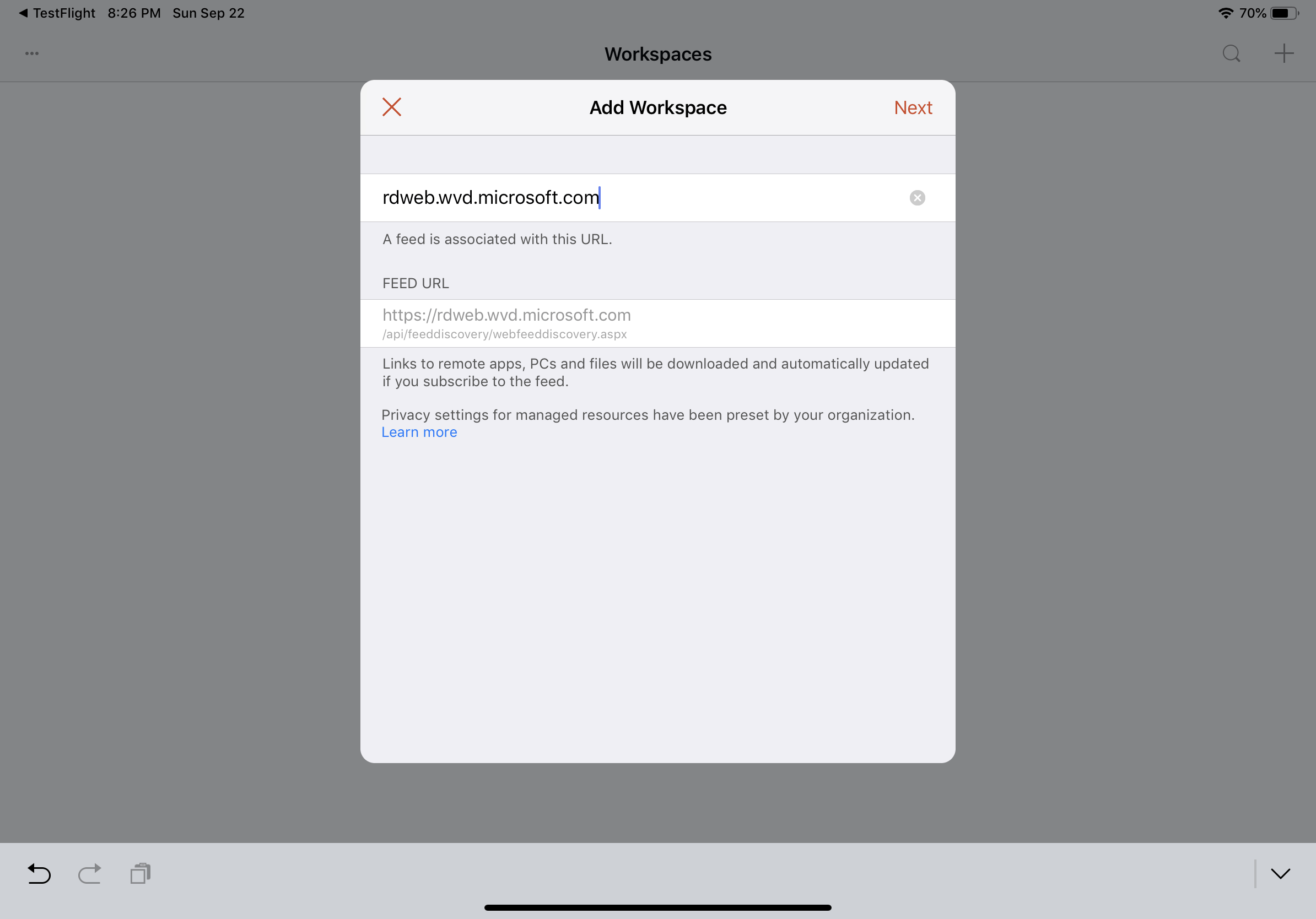
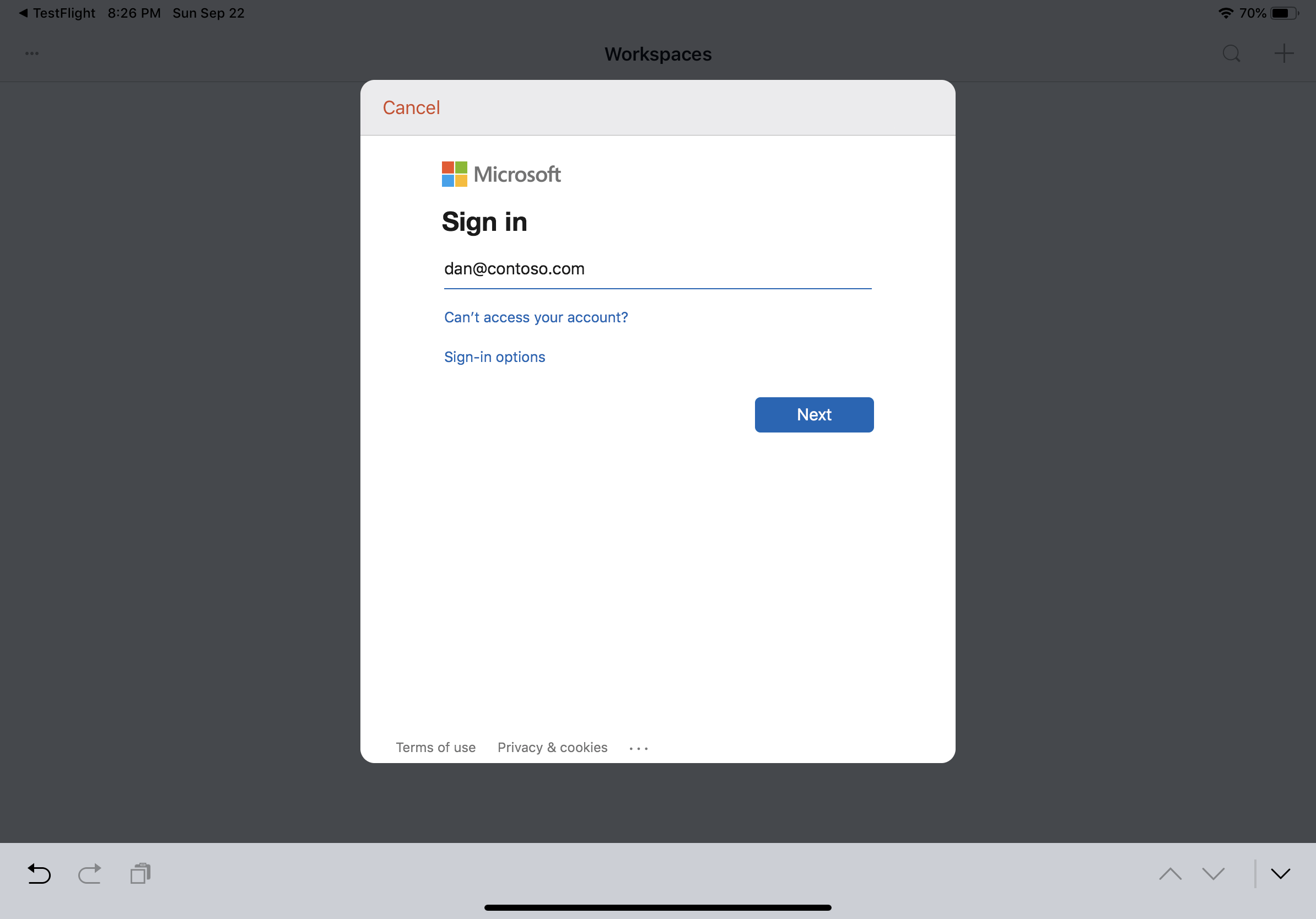
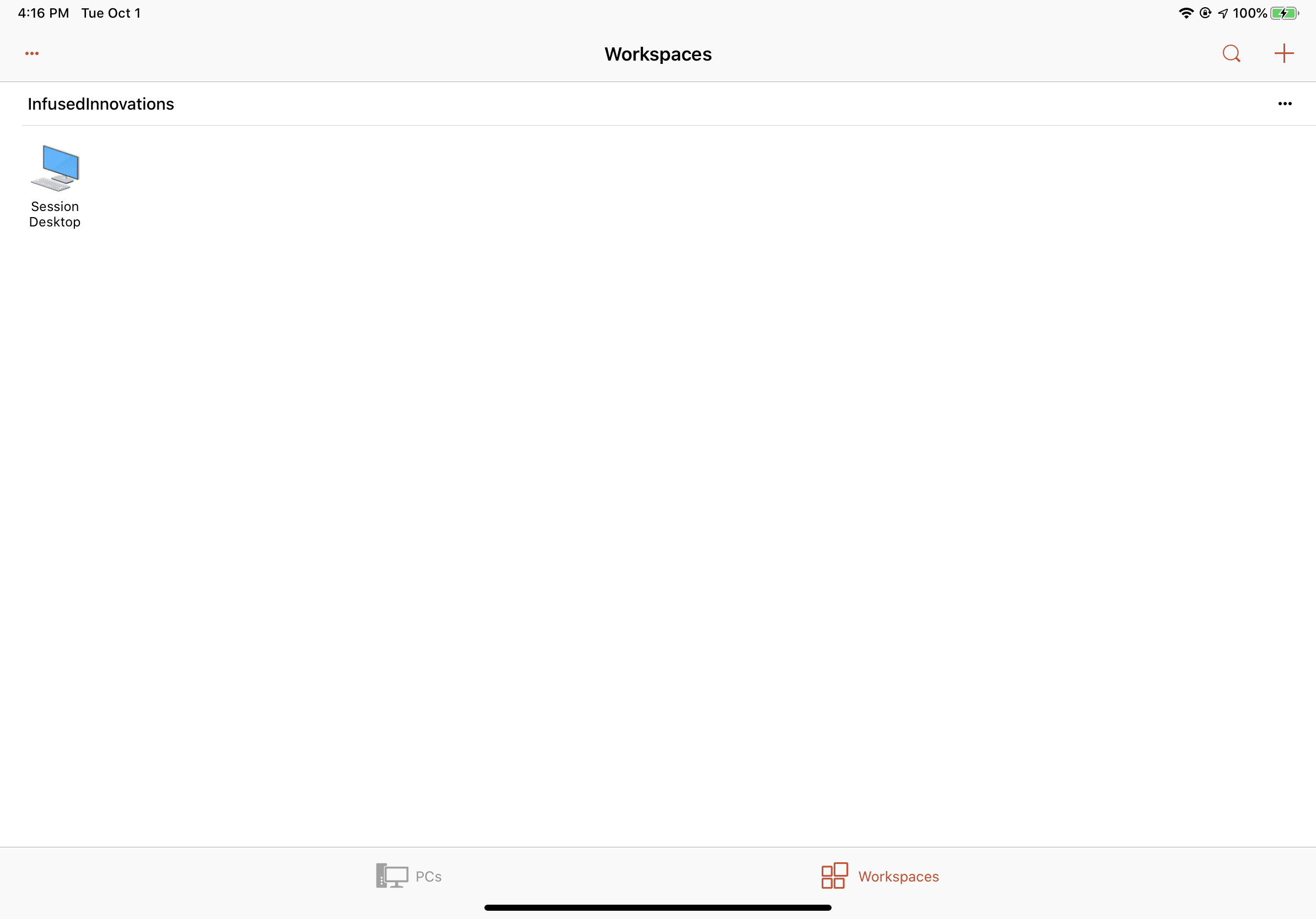
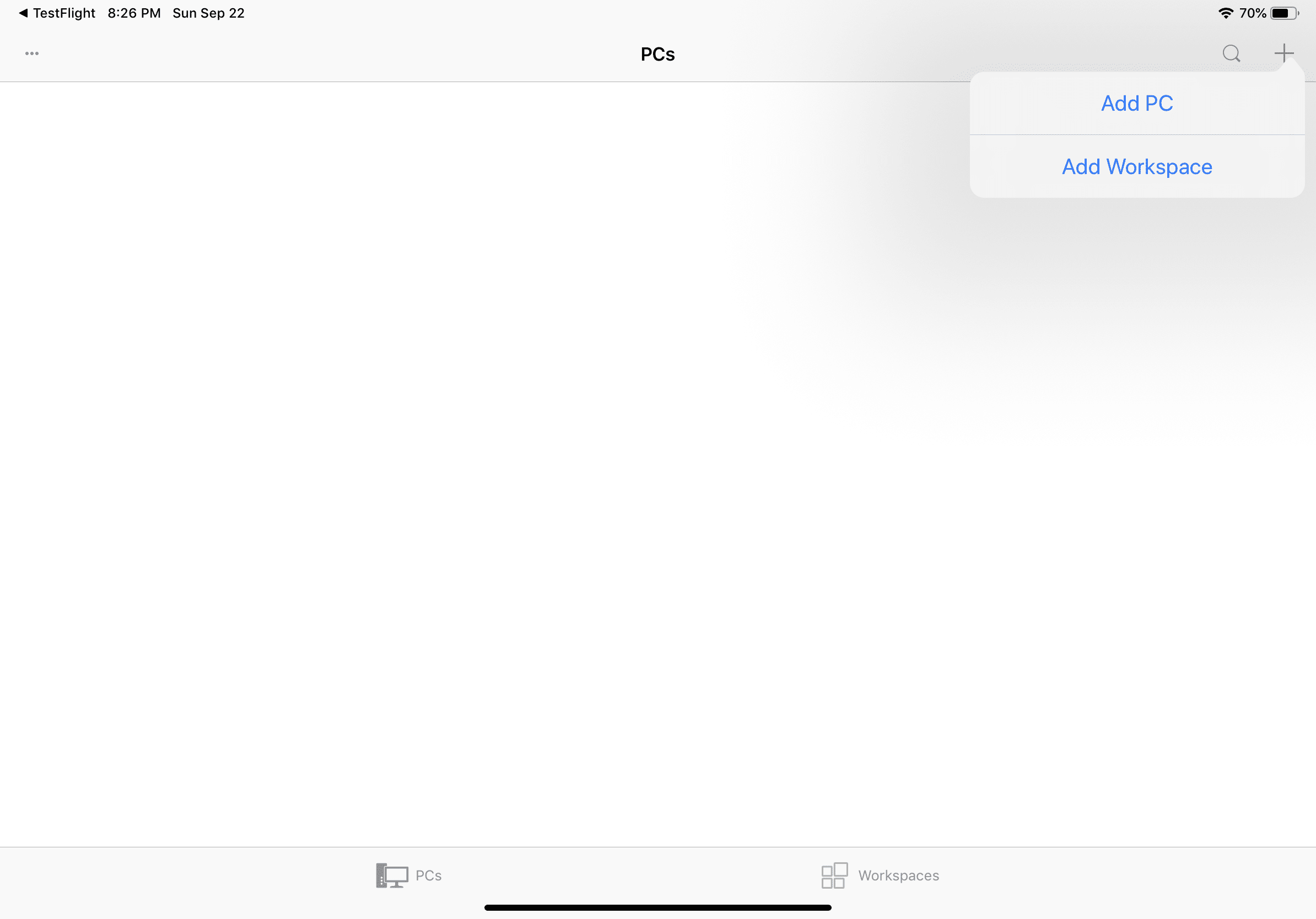
How to connect to WVD (Windows Virtual Desktop) from iPadOS and iOS
**** **  
![Screenshot of iPadOS Remote Desktop Beta homescreen.](https://infusedinnovations.com/hs-fs/hubfs/Imported_Blog_Media/IMG_0002-2.png?width=2388&height=1668&name=IMG_0002-2.png)  
**


**  
![Screenshot of iPadOS RD Beta adding a Workspace feed.](https://infusedinnovations.com/hs-fs/hubfs/Imported_Blog_Media/IMG_0003-2.png?width=2388&height=1668&name=IMG_0003-2.png)  
**

**  
![Screenshot of iPadOS signing into Microsoft 365.](https://infusedinnovations.com/hs-fs/hubfs/Imported_Blog_Media/IMG_0004-2.png?width=2388&height=1668&name=IMG_0004-2.png)  
** **  
![Screenshot of iPadOS showing a session host.](https://infusedinnovations.com/hs-fs/hubfs/Imported_Blog_Media/IMG_0007-2.png?width=2388&height=1668&name=IMG_0007-2.png)  
** **  
![Screenshot of iPadOS connecting to WVD Windows Virtual Desktop.](https://infusedinnovations.com/hs-fs/hubfs/Imported_Blog_Media/IMG_0008-2.png?width=2388&height=1668&name=IMG_0008-2.png)  
**

Don't forget to add MFA to your Remote Desktop App to protect access to your WVD environment.

## Use a Bluetooth Mouse with WVD on your iPad

With iPadOS, you can have the full Windows 10 experience on the go including using your mouse! Apple's iPad Pro is probably the best WVD thin client on the market. (Until the new Surface ARM is announced later today.)

1. Open **Settings **and select **Accessibility**
2. Select **Touch **and then **AssistiveTouch**
3. Disable **Always Show Menu**
4. Select **Pointing Devices** then **Bluetooth Devices**
5. Put your mouse into pairing mode and select **Pair **when it appears
6. Enjoy Windows 10 Enterprise on your iPad with a mouse!

## Conclusion

If you're looking for a way to provide a secure solution for your partners, vendors, clients, or employees to access your environment then Windows Virtual Desktop provides the best Windows 10 experience. Being able to access a full Windows 10 desktop on any device with only your Microsoft 365 account is incredible. There is no user VPN required, no complex PKI required, and no RDS CALs required.

For more details about pricing for WVD, [head over to our pricing guide](https://infusedinnovations.com/blog/secure-intelligent-workplace/wvd-pricing-guide-windows-virtual-desktop).

Learn more about how you can utilize Microsoft 365 tools to [work remotely from home](https://infusedinnovations.com/blog/secure-intelligent-workplace/work-remotely-to-reduce-your-exposure-to-covid-19).

#### **Stay connected.** Join the Infused Innovations email list!

#### Share this

[Share on X ](https://x.com/intent/post?url=https://infusedinnovations.com/blog/intelligent-cloud/connect-to-wvd-from-anywhere&text=Connect%20to%20WVD%20from%20Anywhere) [Share on Facebook ](https://www.facebook.com/sharer/sharer.php?u=https://infusedinnovations.com/blog/intelligent-cloud/connect-to-wvd-from-anywhere&t=Connect%20to%20WVD%20from%20Anywhere) [Share on LinkedIn ](https://www.linkedin.com/shareArticle?mini=true&url=https://infusedinnovations.com/blog/intelligent-cloud/connect-to-wvd-from-anywhere&t=Connect%20to%20WVD%20from%20Anywhere)

Previous

[← WVD Pricing Guide (Windows Virtual Desktop)](https://infusedinnovations.com/blog/intelligent-cloud/azure/windows-virtual-desktop/wvd-pricing-guide-windows-virtual-desktop)

<https://infusedinnovations.com/blog>

Next

[What is Azure Sentinel? →](https://infusedinnovations.com/blog/intelligent-cloud/what-is-azure-sentinel)

### You May Also Like

These Related Posts

[WVD Pricing Guide (Windows Virtual Desktop)](https://infusedinnovations.com/blog/intelligent-cloud/azure/windows-virtual-desktop/wvd-pricing-guide-windows-virtual-desktop)

![](https://infusedinnovations.com/hubfs/Imported_Blog_Media/Windows-Virtual-Desktop-Marketing-1-2.png)

[Technology Architecture & Delivery](https://infusedinnovations.com/blog/tag/technology-architecture-delivery)

#### WVD Pricing Guide (Windows Virtual Desktop)

September 30, 2019  6 min read

[Step-by-Step Guide to Deploy Windows Virtual Desktop in Azure](https://infusedinnovations.com/blog/intelligent-cloud/step-by-step-guide-to-deploy-windows-virtual-desktop-in-azure)

[Azure](https://infusedinnovations.com/blog/tag/azure)

#### Step-by-Step Guide to Deploy Windows Virtual Desktop in Azure
March 22, 2019  6 min read

[Guide to Deploy Office 365 ProPlus in Windows Virtual Desktop](https://infusedinnovations.com/blog/secure-modern-workplace/guide-to-deploy-office-365-proplus-in-windows-virtual-desktop)

![](https://infusedinnovations.com/hubfs/Imported_Blog_Media/Microsoft365-Banner-2.jpg)

[Technology Architecture & Delivery](https://infusedinnovations.com/blog/tag/technology-architecture-delivery)

#### Guide to Deploy Office 365 ProPlus in Windows Virtual Desktop

May 13, 2019  2 min read

### No Comments Yet

Let us know what you think

```json
{
  "@context" : "https://schema.org",
  "@type" : "BlogPosting",
  "author" : {
    "@type" : "Person",
    "name" : "Dan Chemistruck",
    "url" : "https://infusedinnovations.com/blog/author/dan-chemistruck"
  },
  "dateModified" : "2024-07-10T04:15:10.718Z",
  "datePublished" : "2019-10-02T04:00:00.000Z",
  "headline" : "Connect to WVD from Anywhere",
  "image" : [ "https://infusedinnovations.com/hubfs/Imported_Blog_Media/IMG_0008-2.png" ],
  "mainEntityOfPage" : {
    "@id" : "https://infusedinnovations.com/blog/intelligent-cloud/connect-to-wvd-from-anywhere",
    "@type" : "WebPage"
  },
  "publisher" : {
    "@type" : "Organization",
    "logo" : {
      "@type" : "ImageObject",
      "url" : "https://infusedinnovations.com/hubfs/ii-logo.svg"
    },
    "name" : "Infused Innovations"
  }
}
```