
Every Microsoft Copilot for Business, Explained Without the Naming Headache
Microsoft named a lot of different things Copilot.
Some are licenses. Some are app features. Some are agents. Some are builders. Some are security tools. Some are old names that now point to newer names. Some are basically "Copilot, but inside the thing you were already using," which is honestly a lot of the problem.
So yes, this is annoying.
Here is the practical version: if you are trying to figure out which Microsoft Copilot your business actually needs, do not start with the product names. Start with the job.
How To Use This Guide
Do not treat this like homework.
The goal here is not to get you to read every word. It is to give you a north-star reference for Microsoft business Copilot decisions. Use the cheat sheet when you need the quick map. Use the navigation table when someone drops a product name into a meeting and you need the medium dive. Read the whole thing only if you really like Microsoft brand names.
The goal is to make the ecosystem easier to place in your head:
- Quick look: use the cheat sheet.
- Medium dive: jump to the section for the lane you care about.
- Planning mode: read the readiness, licensing, and rollout sections before assigning seats or building agents.
The Practical Answer
There is not one Microsoft Copilot for business. There are several Copilot lanes:
| Lane | What it means |
| Productivity | Microsoft 365 Copilot, Copilot Chat, the Microsoft 365 Copilot app, and app-level Copilot experiences |
| Work artifacts | Search, Pages, Notebooks, Create, Loop, OneDrive, SharePoint, and other places where Copilot helps users create or find work |
| Agents | Focused assistants for specific jobs, teams, workflows, files, sites, or business processes |
| Agent building | Agent Builder, Copilot Studio, declarative agents, connectors, and other extension paths |
| Governance | Microsoft 365 Copilot Control System, Purview, SharePoint controls, Agent 365, identity, logging, lifecycle, and cost controls |
| Business process | Sales, service, finance, supply chain, field service, Business Central, and Dynamics 365 workflows |
| Data and maker tools | Power BI, Fabric, Power Apps, Power Automate, and low-code work |
| Security and IT | Security Copilot, Defender, Entra, Intune, Purview, Sentinel, Azure, and embedded security experiences |
| Developer work | GitHub Copilot Business and Enterprise, coding agents, IDEs, CLI, PRs, and GitHub governance |
The mistake is trying to ask, "Which Copilot should we buy?" before asking, "What work are we trying to improve, what data does it depend on, and what risk is there?"
Microsoft Copilot Cheat Sheet
If you already understand Claude, Gemini, or ChatGPT this helps you place the Microsoft product in your head without pretending the products are identical.
One AI-speak translation before the table, because Microsoft says agent a lot: an agent is usually a saved AI helper with instructions, approved knowledge, and sometimes tools it can use. Sometimes it only answers questions. Sometimes it can draft, route, create, update, or trigger work. That last part is why agents need more governance than a normal chat prompt.
| Microsoft offering | Type | Spoken in plain terms | What it is for | Closest familiar analogy | What to check before rollout |
| Microsoft 365 Copilot | Paid work Copilot | The paid Copilot that works inside Microsoft 365 and can use the work content a user already has access to. | Drafting, summarizing, meeting prep, email help, document work, and questions across Microsoft 365. | Gemini for Google Workspace, ChatGPT Enterprise with company apps/data, Claude Team or Enterprise with files and projects. | Eligible base licenses, add-on licensing, Microsoft Graph permissions, SharePoint/Teams/OneDrive cleanup, and user training. |
| Microsoft 365 Copilot Chat | Work/education chat | A company-safe chat window. Useful, but not the same as the full paid Microsoft 365 Copilot experience. | General chat, web-grounded answers, file-assisted work, and access to some agents. | ChatGPT Business, Claude Team/Enterprise chat, Gemini chat for work. | Included for many eligible users, but agent usage, pay-as-you-go, and capacity can still matter. |
| Microsoft 365 Copilot app | Copilot hub | The front door where Microsoft puts Chat, Search, Agents, Pages, Notebooks, Create, and app access. | Giving users one place to start Copilot work across Microsoft 365. | ChatGPT workspace, Claude workspace, Gemini app/workspace. | Feature availability varies by license, platform, tenant setting, and cloud. |
| Copilot in Word, Excel, PowerPoint, Outlook, Teams, Loop, OneNote, Whiteboard, Forms, OneDrive, SharePoint, and Clipchamp | App experiences | The Copilot button inside the Microsoft app the user already has open. | Drafting docs, analyzing spreadsheets, summarizing meetings, writing emails, building decks, working with notes, files, sites, forms, whiteboards, and video. | Gemini in Docs/Sheets/Slides/Gmail/Meet; ChatGPT or Claude helping with files. | App-specific requirements matter. Functionality varies by license. |
| Microsoft 365 Copilot Search | Enterprise search | Search your work content using normal questions instead of guessing file names and folders. | Finding and summarizing content across Microsoft 365 and connected data sources. | Enterprise search plus chat. | Permissions and connectors decide what can show up. Bad permissions and stale content make search look smarter and wronger at the same time. |
| Copilot Pages, Notebooks, and Create | Work surfaces | Places to keep AI-assisted work instead of losing it in a chat thread. | Collaborative drafts, project context, reusable notes, and content creation inside Microsoft 365 Copilot. | ChatGPT Canvas/Projects, Claude Artifacts/Projects, Gemini Canvas/Notebook-style workflows. | Treat them as work artifacts. They still inherit your Microsoft 365 governance reality. |
| Microsoft 365 agents | Packaged and custom agents | Focused AI helpers for a job, team, file set, system, or workflow. Think "Copilot with a job description." | Reusable assistants for specific tasks, roles, content, or business processes inside Microsoft 365 Copilot. | Custom GPTs, Claude projects with tools/skills, Gemini Gems. | Agent access, data sources, tools/actions, capacity, ownership, publishing, and lifecycle controls. |
| Agents in SharePoint | Site/file-grounded agents | An AI helper pointed at a specific SharePoint site or selected content. | Letting users ask questions about approved documents, policies, project files, or knowledge sets. | A custom assistant grounded in a specific document set. | The agent inherits the users' SharePoint permissions and content quality. Great for curated sites, risky for messy ones. |
| Researcher, Analyst, and other Microsoft 365 role/task agents | Prebuilt Microsoft agents | Microsoft-built helpers for common jobs like research, analysis, people, learning, and workflow support. | Getting a more focused assistant than a blank chat box. | Prebuilt task assistants or specialized GPTs/Gems/Claude projects. | Names, availability, license needs, region, and preview/GA status move. Validate before planning around a named agent. |
| Agent Builder | Simple agent creation | The easier way for users to make a basic agent from Microsoft 365 Copilot. | Creating simple scoped helpers without starting in the full Copilot Studio build experience. | Creating a custom GPT or simple workspace assistant. | Good for simple agents. More serious publishing, connectors, governance, and lifecycle work belongs in Copilot Studio. |
| Microsoft Copilot Studio | Agent builder platform | The builder for more serious business agents. "Make a bot" turns into app/platform work here. | Building, customizing, publishing, and managing agents across Microsoft 365, Teams, SharePoint, websites, apps, and other channels. | OpenAI Agents SDK, GPTs with actions, Gemini Enterprise Agent Platform, Claude tool use/MCP-style workflows. | Licensing, capacity, environments, DLP, connectors, authentication, Dataverse, ALM, testing, and ownership. |
| Microsoft Agent 365 | Agent governance plane | A control center for keeping track of agents before they multiply into a cleanup project. | Observing, securing, governing, inventorying, and managing agents across the organization. | Admin console for enterprise wide agent management. | Validate current packaging, pricing, rollout state, and which agent types it can see/manage. |
| Sales in Microsoft 365 Copilot / Sales agent | Sales workflow agent | Copilot for sellers, tied into Microsoft 365 and CRM work instead of generic chat. | Account prep, CRM help, sales summaries, seller productivity, and sales workflow support. | Sales-specific custom assistant tied to CRM. | Microsoft says this is the evolution of the Dynamics 365 Sales Copilot experience, so naming and packaging can move. |
| Sales Qualification Agent | Dynamics sales agent | A sales development helper for lead research and qualification work. | Lead research, qualification support, and optional engagement patterns inside Dynamics 365 Sales. | A sales development workflow assistant. | It supports sellers. It does not replace seller judgment, CRM hygiene, or qualification rules. |
| Service in Microsoft 365 Copilot | Service workflow app/agent | Copilot for customer service reps working across Outlook, Teams, CRM, and service workflows. | Drafting responses, summarizing cases, preparing service work, and helping reps inside service processes. | Service-specific assistant connected to support systems. | Service licensing, Teams/Outlook deployment, CRM configuration, Power Platform environment behavior, and transcription where relevant. |
| Dynamics 365 customer service, field service, finance, supply-chain, and Business Central Copilot experiences | Business-process Copilots | Copilot inside Microsoft business apps where records, approvals, and operational workflows already live. | CRM, ERP, service, field, finance, supply chain, and operations help. | Department-specific assistants built around business systems. | Availability, naming, licensing, region, and release-wave status vary. Check current Dynamics docs and release plans. |
| Copilot in Power BI | Data and analytics Copilot | Copilot for reports, dashboards, semantic models, and business data questions. | Asking questions about reports, summarizing insights, helping authors build reports, and helping with DAX or semantic models. | Requires paid Fabric capacity. | |
| Copilot in Microsoft Fabric | Data platform Copilot | Copilot across Microsoft's data platform, not just a report helper. | Data engineering, data science, data warehouse, real-time intelligence, Power BI, data agents, SQL database, and AI functions. | Some experiences are preview or capacity-gated. Copilot can consume Fabric capacity, so plan for throttling and cost. | |
| Copilot in Power Apps | Low-code maker assistant | Copilot for people building apps without traditional software development. | Helping makers create and modify apps and data models. | Gemini in AppSheet. | Power Platform environments, Dataverse, connectors, DLP, and maker permissions. |
| Copilot in Power Automate | Automation assistant | Copilot for building workflows from natural language. | Creating, refining, explaining, and troubleshooting cloud flows. | Connector permissions, DLP, approval steps, ownership, error handling, and support. | |
| Microsoft Security Copilot | Security operations Copilot | AI help for security teams, not a general employee chatbot. | Investigation, summarization, response, promptbooks, security agents, and work across Microsoft security products. | Capacity/SCUs, roles, data access, logging, plugins, and embedded experiences. | |
| Security Copilot in Defender, Entra, Intune, Purview, Sentinel, Defender for Cloud, and related tools | Embedded security surfaces | Security Copilot showing up inside the tools security teams already use. | Bringing AI help into endpoint, identity, device, compliance, SIEM, cloud security, and security operations workflows. | Roles, owner settings, data sharing, audit logs, and capacity behavior. | |
| Azure Copilot | Cloud and IT assistant | Copilot for Azure admins and cloud teams inside the Azure context. | Azure design, operations, troubleshooting, cost, and resource management. | Asking ChatGPT/Claude/Gemini cloud-admin questions, but with Azure portal context. | Azure RBAC, PIM, resource locks, network access, national cloud gaps, and preview features. |
| GitHub Copilot | Developer Copilot | Copilot for developers, IDEs, repos, pull requests, CLI, and code workflows. | Code suggestions, chat, code review, CLI help, PR work, Spaces, cloud agent workflows, MCP, and enterprise governance. | Claude Code, OpenAI Codex, Gemini Code Assist. | Business/Enterprise governance, content exclusion, public code matching, model policies, agent controls, audit logs, network settings, and usage management. |
| Industry-specific Copilots, such as Microsoft Dragon Copilot | Industry product | Copilot built for a specific industry workflow, not general office work. | Specialized assistance in regulated or vertical workflows, such as healthcare. | A custom vertical AI assistant. | |
| Windows Copilot, Edge Copilot, Copilot Pro, Microsoft 365 Personal/Family, Xbox Copilot | Mostly consumer or endpoint-adjacent | Stuff with the Copilot name that should not drive your business Copilot strategy. | Personal/device/browser/consumer Copilot experiences. | ChatGPT desktop/mobile, Gemini on Android/ChromeOS, personal assistant apps. |
Where To Go From Here
Do not read this in order unless you want to. Pick the lane that matches the decision in front of you. Future you (and me) can come back and use the same table when Microsoft renames half of this again.
| If you are trying to... | Start here |
| Understand the landscape quickly | Microsoft Copilot Cheat Sheet |
| Decide whether you mean chat, app help, an agent, a builder, or governance | First: Pick The Lane |
| Figure out Microsoft 365 Copilot, Copilot Chat, Search, Pages, Notebooks, or app-level Copilot | Part 1: Everyday Work Copilots |
| Understand agents without pretending "agent" is self-explanatory | Part 2: Agents And Governance |
| Sort out sales, service, finance, ERP, and Dynamics Copilot names | Part 3: Business-Process Copilots |
| Compare Power BI, Fabric, Power Apps, and Power Automate Copilot | Part 4: Data And Maker Copilots |
| Plan for Security Copilot, embedded security experiences, or Azure Copilot | Part 5: Security And IT Copilots |
| Separate GitHub Copilot from the rest of Microsoft 365 Copilot | Part 6: Developer Copilot |
| Keep Windows, Edge, consumer, education, government, and industry names from muddying the plan | Part 7: Edge Cases And Confusing Names |
| Sanity-check licensing and capacity caveats | Part 8: Licensing Reality Check |
| Check the tenant before assigning seats | Part 9: Readiness Before Licenses |
| Choose the right Copilot lane for a real business goal | Part 10: Choosing The Right Microsoft Copilot |
First: Pick The Lane
Most Copilot confusion comes from one word covering five different things.
When someone says "Copilot," ask which one of these they mean:
| Question | You are probably talking about |
| "Can employees ask questions, summarize, draft, and reason over work?" | Microsoft 365 Copilot or Copilot Chat |
| "Can it help inside Word, Excel, Outlook, Teams, PowerPoint, OneDrive, SharePoint, or Clipchamp?" | Microsoft 365 Copilot app experiences |
| "Can users find work content across Microsoft 365 and connected systems?" | Microsoft 365 Copilot Search, Graph connectors, and content governance |
| "Can it become a reusable workspace or artifact?" | Pages, Notebooks, Create, Loop, and related Microsoft 365 Copilot surfaces |
| "Can it do a specific business job?" | Microsoft 365 agents, SharePoint agents, Dynamics agents, or a custom agent |
| "Can we build our own governed assistant?" | Agent Builder, Copilot Studio, declarative agents, connectors, and Power Platform governance |
| "Can we govern all these agents before they multiply?" | Agent 365, Microsoft 365 Copilot Control System, Power Platform governance, Purview, Entra, Defender, and admin controls |
| "Can security teams use it for investigations and response?" | Microsoft Security Copilot |
| "Can cloud admins use it for Azure?" | Azure Copilot |
| "Can developers use it for code?" | GitHub Copilot |
If you skip this step, you get the AI rollouts you hear about in the news: spend a lot of money on licenses, assign them to whoever asked first, run a demo, and then wonder why you're not getting good results for the money you burnt.
Part 1: Everyday Work Copilots
When most people say "Copilot for my business," they usually mean this lane first. At least at the beginning.
Microsoft 365 Copilot
Microsoft 365 Copilot is the paid work Copilot that sits across Microsoft 365 apps and uses organizational context through Microsoft Graph. Microsoft describes it as working with apps like Word, Excel, PowerPoint, Outlook, Teams, Loop, and others, and as using content the user has permission to access.
The important phrase is "the user has permission to access."
Copilot is not a secret company brain. It sees through the signed-in user's permissions and works inside the Microsoft 365 environment you already have. Good for data security. Less fun if your SharePoint and Teams permissions are a decade of "we'll clean that up later."
Where it actually helps:
- Drafting, rewriting, and summarizing documents.
- Summarizing email threads and drafting replies.
- Preparing for meetings from related content.
- Asking questions across accessible files, chats, meetings, and mail.
- Turning meeting transcripts into notes, decisions, and action items.
- Helping users work inside Word, Excel, PowerPoint, Outlook, Teams, Loop, OneNote, Whiteboard, and Forms.
- They assume it fixes content governance. It does not.
- They assign licenses before choosing high-value workflows.
- They treat meeting summaries gospel.
- They do not clean up SharePoint, Teams, OneDrive, or stale content.
- They forget Teams transcription and recording adoption control how useful meeting Copilot can be.
- They do not explain what users should do differently on Monday morning.
Microsoft 365 Copilot Chat
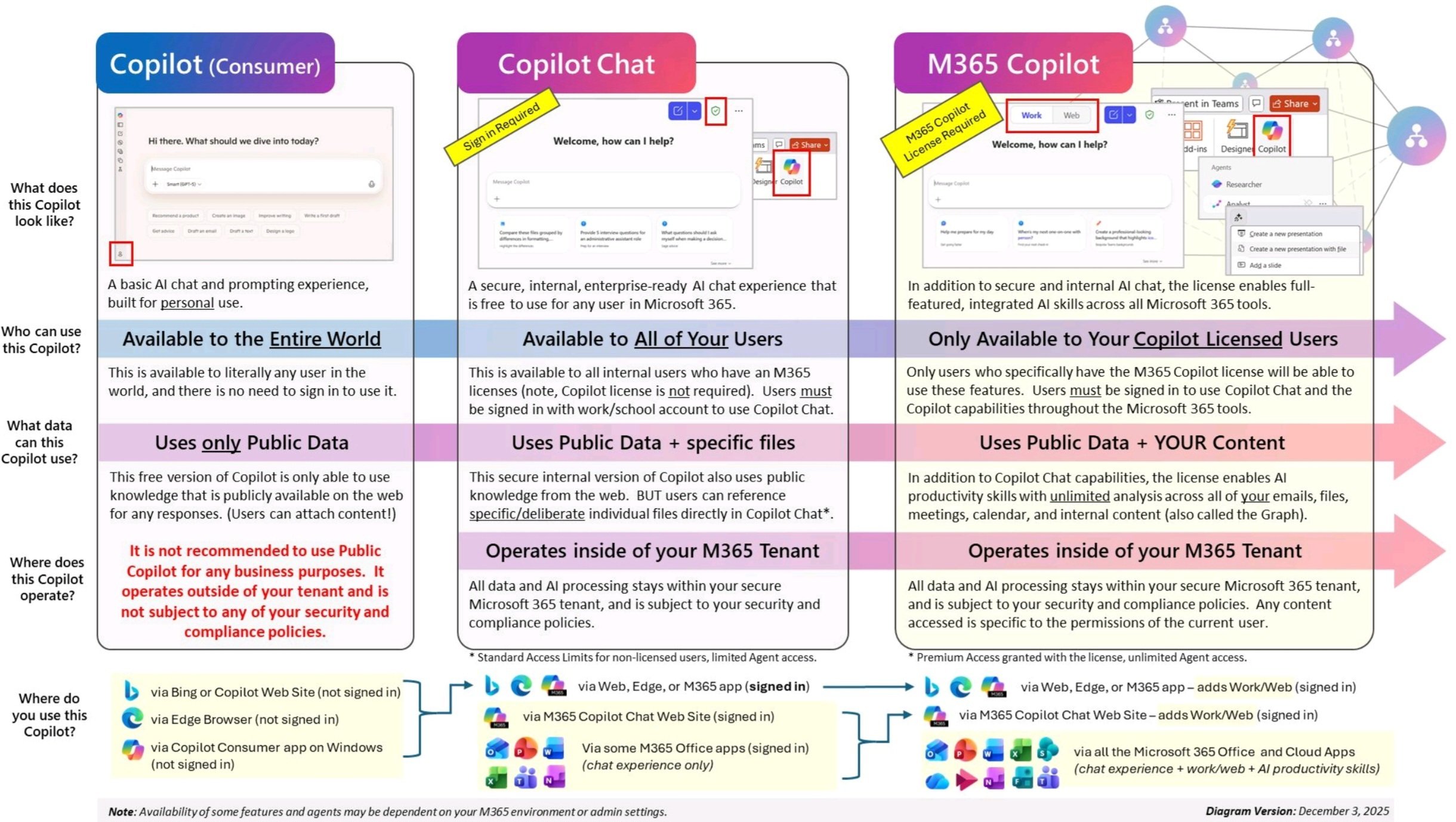
Microsoft 365 Copilot Chat is not the same thing as paid Microsoft 365 Copilot.
The difference is: Microsoft 365 Copilot uses organizational data and the web and requires an add-on license. Microsoft 365 Copilot Chat uses the web and lets users provide organizational data, and it does not require that additional Microsoft 365 Copilot license for eligible users.
That sounds like a small difference, it is not.
Copilot Chat is closer to the general chat experience people know from ChatGPT, Claude, or Gemini, but with Microsoft work identity, admin controls, and commercial protections. It can be a good starting point for secure AI usage, especially if the alternative is employees pasting company content into random consumer tools.
But do not confuse "included chat" with "full Microsoft 365 work-grounded Copilot." If someone expects the full experience across Outlook, Teams, Word, Excel, PowerPoint, Graph, and app context, that is Microsoft 365 Copilot, not Microsoft 365 Copilot Chat.
The sneakiest part is agents. Copilot Chat may be included for eligible users, but they can't build or use agents without additional costs, Copilot Studio capacity, and Azure subscription requirements.
The Microsoft 365 Copilot app
The Microsoft 365 Copilot app is Microsoft's front door for a lot of the work experience now.
It's designed to be the place that brings together Search, Chat, Agents, Pages, Notebooks, content creation, and the various Microsoft 365 Copilot app experiences.
For admins, the app turns Copilot from "one feature" into "a small ecosystem you have to manage":
- Which users have paid Microsoft 365 Copilot?
- Which users have Copilot Chat?
- Which agents can users create or use?
- Is web grounding enabled?
- Which apps are pinned?
- Which experiences are available in your cloud and region?
- Which data is searchable?
- Which interactions are retained, audited, or discoverable?
Copilot in the Microsoft 365 apps
There's also all the Copilot(s) in individual apps and services:- Word
- Excel
- PowerPoint
- Outlook
- Teams
- Loop
- OneNote
- Whiteboard
- Forms
- OneDrive
- SharePoint
- Clipchamp
Usually, treat these as app experiences under the Microsoft 365 Copilot umbrella, not as separate products to buy one by one. There are differences by license, tenant configuration, app version, feature maturity, cloud, and admin settings.
For a business leader, the useful question is not "Does Excel have Copilot?"
Better question: "Do we have a repeatable workflow where Copilot can save time or improve quality without creating a mess of new things to review?"
Same for Outlook. Same for Teams. Same for OneDrive. Same for SharePoint.Start with the work. Pick the Copilot surface. Then check whether the tenant can actually support it. In that order, even though everyone wants to skip to the fun part.
Copilot Search
Microsoft 365 Copilot Search is an AI search experience across Microsoft 365 and connected data sources.
Great when the content estate is clean. Less great when Copilot becomes the fastest way to discover content from 2013, poorly named files, ownerless sites, and permissions that made sense six years ago.
Search is only as good as the information estate behind it.
If you want Copilot Search to feel trustworthy, you need boring things:
- Content owners
- Sensitivity labels
- Permission cleanup
- Site lifecycle rules
- Authoritative source locations
- A plan for stale content
- A way to handle oversharing before users discover it with nicer wording
Pages, Notebooks, and Create
Microsoft 365 Copilot also includes newer work surfaces like Pages, Notebooks, and Create.
Think of these as AI-native workspaces and artifacts inside the Microsoft 365 Copilot world. They are similar in spirit to things like ChatGPT Canvas or Projects, Claude Artifacts or Projects, and Gemini Canvas or Notebook-style workflows.
The goal is not "a new version of Word" or "a new version of OneNote." It is a new work surface where Copilot can be more than a chat box: a place where prompts, files, outputs, collaboration, and work context live together.
Part 2: Agents And Governance
The first AI tool wave was mostly chatbots. You put in a request and got an answer back.
The next wave is agents.
Microsoft agents are focused assistants that can work with specific data sources, tasks, roles, or business processes. That sentence sounds simple. The annoying part is that "agent" can mean several different things depending on where it lives, what data it can see, and whether it can take action.
Microsoft 365 agents
Microsoft 365 agents are agents that live inside the Microsoft 365 Copilot ecosystem. Some are built by Microsoft. Some can be built by your organization. Some are role-based, some are process-based, some are grounded in Microsoft 365 data, and some connect to external systems. Same word, several shapes.
There are a few different agent shapes worth separating:
| Agent shape | What it usually means |
| Prebuilt Microsoft agents | Microsoft-created agents for common tasks, such as research, analysis, people, learning, workflow, sales, service, or other role-specific scenarios |
| SharePoint agents | Agents grounded in selected SharePoint content or sites |
| Declarative Microsoft 365 agents | Agents that extend Microsoft 365 Copilot with defined instructions, knowledge, and actions |
| Copilot Studio agents | More configurable agents built and governed through Copilot Studio and Power Platform |
| Business-application agents | Dynamics, sales, service, finance, supply-chain, or other process agents |
| Security agents | Security Copilot agents, plugins, promptbooks, and embedded security workflows |
| Developer agents | GitHub Copilot agents and coding workflows |
That split matters because "agent" does not always mean the same admin path, data path, cost model, or risk model.
Microsoft's prebuilt agents are useful less as a shopping list and more as a pattern:
- Researcher: an agent that can dig into a topic using Microsoft 365 data, public web data, or both, then produce a report.
- People Agent: an agent that helps you identify the right person inside the company based on skills, role, or context.
- Writing Coach-style helper: an agent pattern for improving drafts, sharpening tone, and helping users get better at writing over time.
- Naming agents: agents that know our naming conventions and help people name new resources consistently. Not glamorous. Very useful.
- Project Management Agent: an assistant that helps engineers turn technical work into project plans, then hand those plans to project managers without losing the plot. The best version speaks enough "engineer" for PMs and enough "PM" for engineers. It can also connect to the project management system so executives can pull client status updates without waiting on someone else to build a report.
- RFP Builder: an agent that takes in an RFP, reviews previous RFPs, and drafts a proposal using our language, pricing, and templates.
- Askio: a simple Microsoft 365 helper for quick "how do I do this?" questions in Word, Excel, PowerPoint, Outlook, Teams, and the rest of the usual Office suite.
That is the practical version of agents: a defined helper with a job, a boundary, and a reason to exist. Not "a bot that knows everything."
Good first targets:
- HR policy lookup with citations to approved sources.
- Sales account prep from CRM, email, meetings, and documents.
- IT help desk triage that creates tickets with the right fields.
- Project status synthesis from Teams, Planner, documents, and meetings.
- Finance reconciliation support with human approval.
- Customer service case research and summarization.
- "Make an agent that knows everything."
- "Make an agent that replaces the person who currently understands the process."
- "Make an agent that handles our whole sales pipeline."
Agents in SharePoint
Agents in SharePoint deserve their own mention because they are one of the more practical on-ramps.
The idea is simple: create an agent that answers questions from selected SharePoint content. That can be great for:
- HR policy sites.
- Safety procedures.
- Sales enablement libraries.
- Legal guidelines.
- New hire onboarding.
- Project document sets.
- Standard operating procedures.
SharePoint agents follow SharePoint permissions and organizational security policies. That helps. It also means the agent is only as trustworthy as the selected site's content, owners, permissions, lifecycle, and sources.
An agent over a clean policy site can be useful fast. An agent over a random shared site can become a headache-inducing waste of time.
Prebuilt Microsoft agents
Microsoft is also shipping more prebuilt agents across Microsoft 365 Copilot. Broadly, the pattern is still more "gather, synthesize, and draft" than "go run the whole business process," although that line is moving.
The useful thing is the direction: research, analysis, people, learning, workforce insights, workflows, sales, service, and employee self-service are all places Microsoft is trying to turn Copilot from a blank chat box into a more specialized helper.
Agent Builder
Agent Builder is the simpler way to create agents from inside Microsoft 365 Copilot.
Use it for narrower, lower-risk personal assistants where the scope is clear and the data is already reasonably controlled.
Do not use it as an excuse to avoid governance. Simple creation is useful. Simple creation at scale without ownership is how you get half the company using an agent linked to one person's account.
Microsoft Copilot Studio
Copilot Studio is Microsoft's more serious agent builder platform.
Think of Agent Builder as "I need a scoped helper." Think of Copilot Studio as "we need an agent that can be connected, published, governed, and supported."
Use it to build, customize, publish, and manage agents for a team or the whole organization. The simple version might be an in-tenant assistant that answers questions using approved Microsoft 365 content and supported third-party data. The more serious version might watch a customer service inbox, compare incoming requests against the knowledge base, draft a response or next steps, and route the work for review.These agents can be published across Microsoft 365, Teams, SharePoint, websites, apps, and other channels. Once you are here, you are doing platform work, which means the familiar Power Platform realities come with it:
- Environments
- DLP policies
- Connectors
- Authentication
- Dataverse
- Capacity
- ALM
- Maker permissions
- Publishing controls
- Monitoring
- Knowledge sources
- HTTP actions
- Skills
- Event triggers
- Channels
This is the part where "we just need a chatbot" becomes "who owns the environment, connector, data, deployment, and support model?"
Copilot Studio is powerful, but it is not magic. It is a platform. Platforms need owners, standards, intake, lifecycle management, and support paths.
Microsoft Agent 365
Microsoft Agent 365 is the governance/control-plane side of the agent story.
Microsoft positions it around observing, governing, and securing agents across the organization. That includes things like registry, agent analytics, onboarding, integration management, lifecycle management, audit and logging, data compliance, access control, data security, and threat protection.
Microsoft would not be building an agent control plane if agent sprawl were imaginary.
If every team can create or buy agents, IT and security need a way to answer basic questions:
- What agents exist?
- Who owns them?
- What data can they access?
- What tools can they use?
- What actions can they take?
- What logs exist?
- What happens when an owner leaves?
- What agents should be retired?
- Which agents are risky?
Agents change the risk model
A normal AI chat usually creates text.
An agent can combine instructions, data, tools, actions, connectors, permissions, memory or state, publishing channels, cost, and logs.
That means your governance model has to answer more than "can users prompt it?"It needs to answer:
- Who can create agents?
- Who approves agents?
- Who owns each agent?
- Which knowledge sources are allowed?
- Which connectors and HTTP actions are allowed?
- Can the agent be used by anonymous users, guests, customers, or only employees?
- What actions can it take without approval?
- What data can it retrieve?
- What logs exist?
- How is usage billed or metered?
- How do you retire stale agents?
Part 3: Business-Process Copilots
The business-process names are where Microsoft really starts testing your patience.
Microsoft has used names like Copilot for Sales, Sales in Microsoft 365 Copilot, Copilot in Dynamics 365 Sales, Sales agent in Microsoft 365 Copilot, Service in Microsoft 365 Copilot, Copilot for Service, finance agents, and Dynamics 365 agents. Some product pages have shifted. Some names are being folded into the broader Microsoft 365 Copilot agent story. And yes, the old blog posts are still out there confusing everyone.
My advice: Start with one of the general Copilot tools (Microsoft 365 Copilot, Microsoft 365 Copilot Chat) and see if that meets 80% of your needs, then check the current product page, licensing guide, and platform documentation for the specific workload.
Sales agent and Copilot in Dynamics 365 Sales
Copilot in Dynamics 365 Sales helps sellers summarize records, catch up on recent changes, prepare for meetings, get account news, use SharePoint content, and work with email.
The Sales agent in Microsoft 365 Copilot is the evolution of the sales Copilot experience in Microsoft Dynamics 365 Sales, and that Sales agent will become the preferred way to access Copilot assistance in Dynamics 365 Sales.
That is a sentence only a Microsoft ecosystem could produce, but the meaning is useful:Sales Copilot is moving toward an agent experience across Microsoft 365 apps AND Dynamics 365 Sales.
If you are planning a sales agent rollout, validate:
- Which CRM is in scope, such as Dynamics 365 Sales or Salesforce.
- Which Microsoft 365 apps sellers actually use.
- Which records and files sellers can access.
- Whether meeting prep, email follow-up, opportunity summaries, or account research are the first use cases.
- Whether your CRM data is clean enough to trust in summaries.
- Which license path applies now, not six months ago.
- Whether Teams meeting transcripts are enabled where meeting summaries matter.
- Whether Power Platform connectors and DLP policies allow the CRM integration.
- Whether the first user sign-in creates supporting Dataverse/Power Platform environment behavior you actually want.
Sales Qualification Agent
The Sales Qualification Agent is another example of where the Copilot ecosystem is pushing from "assistant" toward "workflow agent."
Note: It can help with lead research and qualification patterns, but it should not replace seller judgment, qualification rules, or CRM hygiene.
If lead data is weak, territory rules are unclear, or sales and marketing disagree on what qualified means, an agent will not settle the argument. It will just be authoritatively confused.
Service in Microsoft 365 Copilot and customer service agents
Service in Microsoft 365 Copilot is aimed at customer service representatives working across Outlook, Teams, CRM environments, and service workflows. Primarily for Dynamics 365 Customer Service and Salesforce, plus embedded widgets for non-Microsoft CRM systems.
Customer service agents can help with case management, intent, summarization, response drafting, and support workflows.
That can be genuinely useful because customer service work has repeatable patterns: cases, histories, knowledge articles, emails, chats, escalations, resolution notes, SLAs, and handoffs.
The risk comes from the same place.
If the knowledge base is stale, the agent will sound confident with stale information. If case routing is messy, the agent will inherit that mess. If approval rules are vague, agents will make the ambiguity faster.
Use customer service agents where the workflow is well-defined and the source material has owners. That sentence sounds obvious until you see how many support knowledge bases were all owned by Ted, who's been gone for 3 years.
Finance, supply-chain, field-service, and ERP agents
Microsoft is also pushing agents into finance and operations scenarios, such as account reconciliation and supplier communication.
These are not "cute productivity assistants." They sit near money, vendors, controls, approval chains, and audit.
Before you deploy finance or supply-chain agents, define:
- Human approval points
- Exception handling
- Audit requirements
- Data boundaries
- Who owns the process
- Which actions the agent can take
- What the agent is allowed to draft versus submit
The button exists. Great. That does not mean its okay to just drop it in.
For Dynamics 365 Customer Service, Field Service, Finance, Supply Chain Management, and Business Central, treat Copilot feature names and agent availability as release-plan dependent. Microsoft updates these workloads frequently.
Part 4: Data And Maker Copilots
This lane is for the teams that build, analyze, automate, and operate inside Microsoft's data and low-code platforms.Copilot in Power BI
Copilot in Power BI helps users ask questions about reports, summarize insights, create visuals, and help report authors build reports or work with DAX and semantic models.
This one is easier to place in your head than most of the Copilot naming mess. If you have used ChatGPT Advanced Data Analysis, Claude for data analysis, or Gemini with spreadsheet/data workflows, you get the general idea.
But Power BI Copilot is not just "upload a spreadsheet and ask questions." It depends on Power BI and Fabric concepts:
- Semantic models
- Reports
- Workspaces
- Apps
- Fabric capacity
- Admin settings
- User permissions
- Data preparation
An important licensing/admin point: Copilot in Power BI requires paid Fabric capacity. Pro or Premium Per User alone is not enough.
Also watch capacity. Copilot can consume Fabric capacity, so a broad rollout can create throttling or disruption for analytics workloads.
Copilot in Microsoft Fabric
Fabric Copilot extends AI help across Fabric workloads like Data Engineering, Data Science, Data Factory, Data Warehouse, Real-Time Intelligence, and Power BI.
For technical teams, Fabric Copilot can help with data pipelines, queries, summaries, and analysis. For leaders, the important part is simpler:
Fabric Copilot is only as useful as your data platform is usable. Not elegant, but accurate.
If your data estate has unclear ownership, duplicated models, no trust layer, and undocumented metric definitions, Copilot may help people move faster, but not necessarily in the same direction.
Also watch preview status, regional processing, sovereign-cloud support, and cross-geo settings. The Fabric story is powerful, but the admin evaluation is not optional.
Copilot in Power Apps
Copilot in Power Apps helps makers create and modify apps with AI assistance.
Useful for prototypes, internal tools, forms, and workflow apps. The catch is the same old Power Platform catch: someone still owns the environment, connectors, DLP, support, and app lifecycle.
Questions to ask:
- Which environment should this app live in?
- Who owns it after the maker moves on?
- What connectors does it use?
- Does DLP allow the data combination?
- Does the app need Dataverse?
- Is there an ALM path?
- How will support work?
Copilot in Power Automate
Copilot in Power Automate helps users create cloud flows from natural language and refine automations.
That is a good fit for repeatable workflows:
- Approval routing
- Notifications
- Intake processing
- Status updates
- Simple handoffs
- Scheduled reporting
It will also create fragile automation when the process is half-understood.
Before you automate, ask:
- What triggers the flow?
- What system is the source of truth?
- What happens when the flow fails?
- Who gets alerted?
- What data crosses boundaries?
- What approvals are real versus decorative?
Part 5: Security And IT Copilots
Security and IT Copilots are different from general productivity Copilots. They should feel different in the rollout plan too.
They operate closer to incidents, access, devices, compliance, cloud resources, and operational risk. They need tighter controls and clearer ownership.
Microsoft Security Copilot
Microsoft Security Copilot is built for security and IT workflows. Microsoft documents it across standalone and embedded experiences, including Defender, Entra, Intune, Purview, Sentinel, Defender for Cloud, threat intelligence, plugins, connectors, promptbooks, and agents.
The best analogy is not "ChatGPT for security."
The better analogy is "an AI analyst layer inside Microsoft security operations."
That matters because the value depends on your security tooling, telemetry, roles, plugins, promptbooks, and response process. If those are immature, Security Copilot can still help with summarization and investigation, but it will not magically create a mature SOC.
Good places to use it:
- Summarizing incidents
- Explaining scripts or suspicious activity
- Triage support
- Threat intelligence enrichment
- Promptbooks for repeatable investigation patterns
- Reporting and handoff notes
- Embedded assistance in Defender, Sentinel, Entra, Intune, and Purview workflows
- Role assignment
- Capacity and billing
- Security Compute Units and overage policy
- Plugin configuratio
- Audit logging
- Data sharing settings
- Government-cloud availability
- Over-trusting generated explanations
- Assuming "AI-assisted" means "approved"
Security Copilot can make good analysts faster. It can make weak process look polished too. Different problem.
Defender, Entra, Intune, Purview, Sentinel, And Other Embedded Surfaces
When you see Copilot inside Defender, Entra, Intune, Purview, Sentinel, or similar tools, treat it as a Security Copilot experience unless Microsoft is clearly selling something separate.
That framing keeps the map cleaner. Mostly.
You do not need a separate strategy for "Entra Copilot" and "Purview Copilot" as if they are unrelated products. You need a security and compliance AI strategy that says:
- Which roles can use these features?
- Which data can be accessed?
- Which prompts and responses are logged?
- Which outputs need human review?
- Which actions require approval?
- Which use cases are approved first?
Azure Copilot
Azure Copilot is Microsoft's AI assistant for Azure. It can help with resource questions, design, troubleshooting, operations, cost, and portal workflows.
The closest general analogy is asking ChatGPT, Claude, or Gemini for Azure guidance, except Azure Copilot can use Azure context the signed-in user has permission to access.
That is the upside. The catch is the usual Azure catch: permissions and operational guardrails decide how far you should let it go.
Good places to use it:
- Finding resources
- Understanding configuration
- Troubleshooting
- Cost and optimization questions
- Drafting deployment or architecture guidance
- Explaining what is running in an environment
- Preview features
- Regional availability
- Tenant and subscription access
- Action confirmation
- RBAC boundaries
- Privileged Identity Management
- Azure Policy
- Resource locks
- National cloud availability
- Network access to required services
- Overreliance on generated recommendations without engineering review
Part 6: Developer Copilot
GitHub Copilot is the developer Copilot.
This comparison is cleaner than most of the Microsoft AI pile, thankfully. The closest analogies are Claude Code, OpenAI Codex, and Gemini Code Assist.
GitHub Copilot can help with:
- Code completions
- IDE chat
- Repository-aware questions
- Pull request summaries
- Code review
- CLI assistance
- Agentic development tasks
- Documentation
- Tests
- Enterprise policy and governance
For businesses, focus on GitHub Copilot Business and GitHub Copilot Enterprise rather than personal developer plans.
The governance questions are different from Microsoft 365 Copilot:
- Which repositories can Copilot access?
- Are content exclusion rules needed?
- Is public code matching enabled or disabled?
- Which models are allowed?
- Are agentic features enabled?
- How are generated changes reviewed?
- What happens in regulated codebases?
- How are usage and quality measured?
- What is the policy for secrets, proprietary code, and dependency suggestions?
- Are network allowlists required?
- Are audit logs and agentic activity reports being reviewed?
Part 7: Edge Cases and Confusing Names
There are plenty of Copilot names that belong in footnotes, not the main buying map. Some of them will still show up in conversations anyway.Industry-specific Copilots
Microsoft has industry-specific Copilot products and branded experiences, such as healthcare-oriented products like Microsoft Dragon Copilot.
If you are in healthcare, public sector, finance, manufacturing, or another regulated industry, validate:
- Product availability
- Compliance posture
- Data handling
- Licensing
- Integration model
- Regional availability
- Whether it is Microsoft 365, Dynamics, Nuance, Azure, or another Microsoft product family underneath
Education and government
Education and government cloud availability often varies by product and feature.
The names can look similar, but availability, licensing, compliance, functionality, and rollout paths may be different. This is especially true for GCC, GCC High, DoD, sovereign clouds, and regional data boundaries.
Windows, Edge, Copilot Pro, and consumer products
Windows Copilot, Edge Copilot, Copilot Pro, Microsoft 365 Personal/Family Copilot experiences, and Xbox Copilot are (hopefully) not the part of a business Copilot strategy.
They will confuse users because the logo and name look familiar (Thanks Microsoft...). But they are not the same tooling as the Microsoft Copilot Ecosystem for businesses.
Part 8: Licensing Quick Reference
Below is a quick reference for how you actually pay for these things. Check the live pricing pages for the actual costs.
| Product area | Practical licensing |
| Microsoft 365 Copilot | An add-on to eligible Microsoft 365 plans. |
| Copilot Chat | Incldued in most Microsoft 365 plans. Additional capabilities available with Pay-As-You-Go options. |
| Copilot Studio | Requires licensing pack or Pay-As-You-Go enabled. |
| Power BI and Fabric Copilot | Requires paid Fabric capacity capacity. |
| Security Copilot | Included with some Microsoft 365 licenses or available as a standalone capacity. |
| Dynamics 365 agents and Copilot experiences | Depends on the Dynamics product, region, feature state, and current packaging. Validate workload by workload. |
| GitHub Copilot | Standalone plans available via organization Github accounts. |
| Azure Copilot | Generally included with Azure |
| Agent 365 | An add-on to eligible Microsoft 365 plans |
Part 9: Readiness Before Licenses
Before you assign Microsoft 365 Copilot licenses broadly, check the boring things.
| Readiness item | Why it matters |
| Eligible base licenses | Microsoft 365 Copilot is an add-on to qualifying plans. |
| Exchange Online primary mailboxes | Outlook and mailbox scenarios do not work the same way against shared, delegate, group, or archive mailboxes. |
| Microsoft 365 Apps update channel | Users need supported apps and update channels. Semi-annual enterprise patterns can slow Copilot availability. |
| OneDrive and core Microsoft 365 services | Some Copilot file and app experiences depend on services like OneDrive, Loop, Whiteboard, and Teams being enabled. |
| Teams transcription and recording | Meeting and call usefulness depends heavily on transcript availability. |
| SharePoint and OneDrive permissions | Copilot surfaces what users can access. That makes oversharing a readiness issue. |
| Microsoft Purview | Sensitivity labels, retention, audit, content search, DLP, and data security posture matter for Copilot interactions. |
| Usage and readiness reporting | Copilot Dashboard, readiness reports, and usage reports help pick pilot cohorts and measure adoption. |
Part 10: Choosing The Right Microsoft Copilot
Use this decision flow.
| If the real goal is... | Start with... | Do not start with... |
| Safer general AI chat for employees | Microsoft 365 Copilot Chat | A full Microsoft 365 Copilot rollout for every user |
| AI inside documents, email, meetings, and Microsoft 365 work | Microsoft 365 Copilot | Copilot Studio |
| A specific business workflow assistant | Microsoft 365 agents, Dynamics agents, or Copilot Studio | Generic prompt training |
| A sales workflow assistant | Sales in Microsoft 365 Copilot, Sales agent, Dynamics 365 Sales guidance, and Sales Qualification Agent where appropriate | A custom agent before checking the current sales product path |
| Customer service or contact-center assistance | Service in Microsoft 365 Copilot, Dynamics 365 Customer Service agents, CRM readiness, and knowledge readiness | A chatbot with no process owner |
| Data analysis inside reports and semantic models | Power BI Copilot and Fabric readiness | Uploading random exports into a generic chat tool |
| Low-code app or workflow creation | Power Apps, Power Automate, and Copilot Studio | A one-off automation with no owner |
| SOC and security operations help | Microsoft Security Copilot | Microsoft 365 Copilot |
| Azure operations and cloud troubleshooting | Azure Copilot | General Copilot Chat as the primary cloud admin tool |
| Developer productivity | GitHub Copilot Business or Enterprise | Microsoft 365 Copilot |
| Agent governance at scale | Agent 365 plus Power Platform and Microsoft 365 governance | Letting every team build agents first and asking questions later |
The Bottom Line
Microsoft Copilot for business is not one product.It is more like an ecosystem of tools:- Microsoft 365 Copilot for everyday work.
- Copilot Chat for secure work chat.
- The Microsoft 365 Copilot app for Chat, Search, Agents, Pages, Notebooks, Create, and app access.
- App experiences inside Word, Excel, PowerPoint, Outlook, Teams, Loop, OneNote, Whiteboard, Forms, OneDrive, SharePoint, and Clipchamp.
- Microsoft 365 agents, SharePoint agents, prebuilt agents, and custom agents for specific tasks and workflows.
- Agent Builder and Copilot Studio for creating agents.
- Agent 365 for agent governance.
- Sales, Service, and Dynamics agents for sales, service, finance, field service, supply chain, and operations.
- Power BI and Fabric Copilot for data and analytics.
- Power Apps and Power Automate Copilot for makers and automation.
- Security Copilot for security and IT.
- Azure Copilot for cloud operations.
- GitHub Copilot for developers.
The useful question is not "Which Copilot is best?"
The useful question is: What work are we trying to improve, what data does it depend on, what is the risk, and which Copilot lane actually matches that job?
Stay connected. Join the Infused Innovations email list!
Share this
You May Also Like
These Related Posts

Navigating the Buzz Around Copilot: A Business Leader’s Perspective
Decoded: The Difference Between Consumer Copilot, Copilot Chat, and Microsoft 365 Copilot

No Comments Yet
Let us know what you think