
One of the most frequent questions we receive is simple yet complex: "Which Microsoft Copilot am I supposed to use?" Microsoft has applied the "Copilot" brand across their entire ecosystem, leading to understandable confusion.
The reality is that there are three distinct "tiers" of Copilot, each serving a different purpose, accessing different data, and (most importantly) offering different levels of security. If you are using AI for business, knowing these differences is critical for your data compliance.
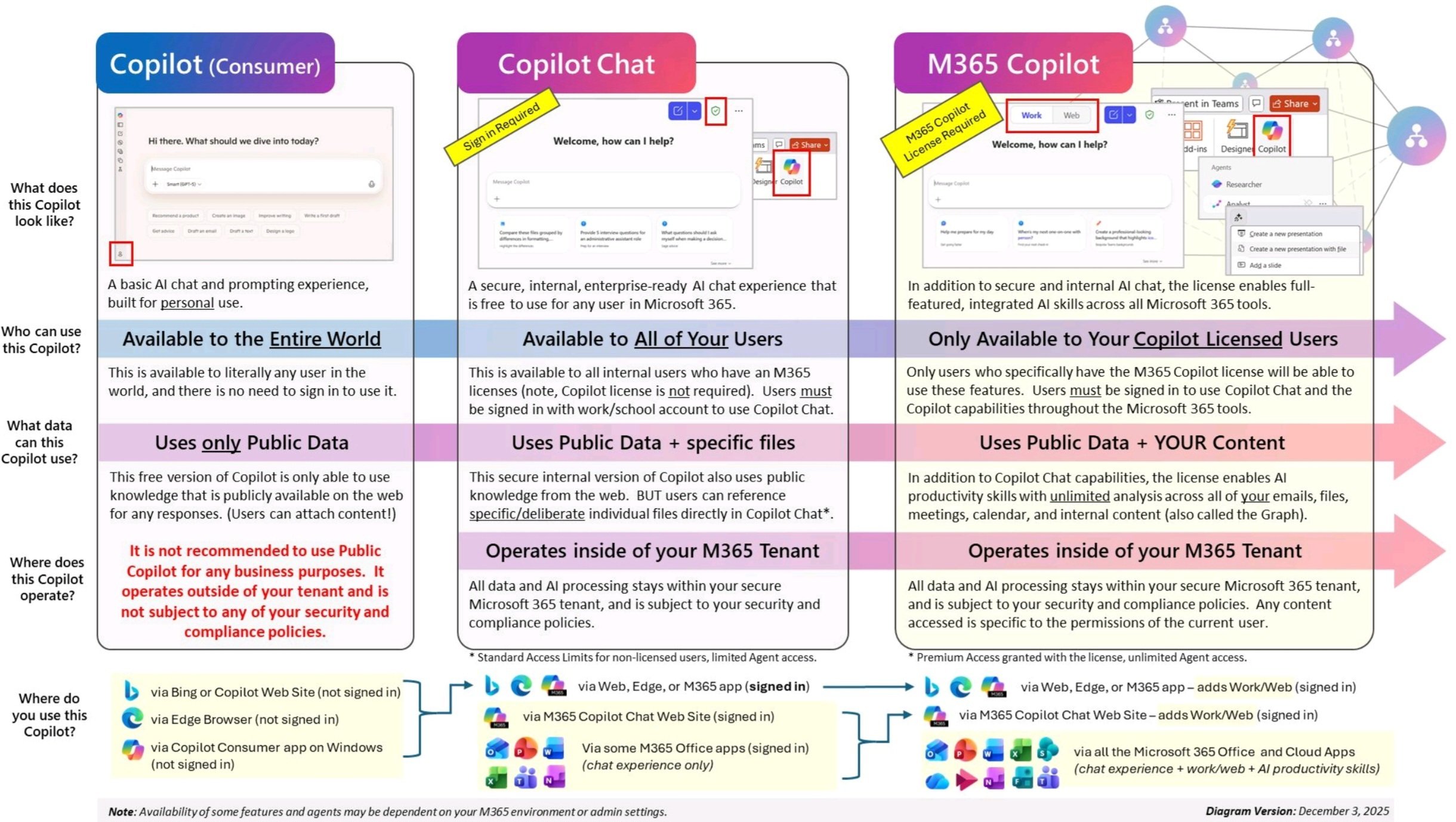
Let's explore the variants in a little more detail!
Copilot (Consumer): The "Public" Web Version
This is the version available to the entire world. It requires no sign-in and relies strictly on public data. While it offers a basic AI chat experience similar to ChatGPT, it operates entirely outside of your corporate environment.
The Business Risk: We strongly recommend against using this version for business purposes. Because it operates outside your Microsoft 365 tenant, it is not subject to your company’s security or compliance policies. Anything typed into this version is not covered by enterprise data protection standards.
Copilot Chat: The "Enterprise-Ready" Baseline
Many organizations don't realize they already have access to this middle tier. "Copilot Chat" is available to all internal users with a standard Microsoft 365 license at no additional cost. The critical difference here is the "Sign-in Required" component. When your users sign in with their work accounts, Copilot shifts to operate inside your M365 tenant.
The Benefit: This version is safe for work. All data and AI processing stay within your secure tenant boundary, meaning it adheres to your organization's compliance policies. However, it is somewhat limited in scope; it uses public knowledge plus specific files you deliberately upload, but it cannot "see" your emails or calendar automatically.
Microsoft 365 Copilot: The Full Productivity Suite
This is the premium, licensed version you hear the most about. While it shares the same robust security boundary as the "Chat" version (operating safely inside your tenant), the key differentiator is Graph access.
The Power of Context: Unlike the other versions, M365 Copilot has "unlimited analysis" across your entire digital work life: your emails, meetings, calendar, and internal files. It doesn't just answer questions; it integrates directly into Word, Excel, PowerPoint, and Teams to create content for you. It can look at a Word document and turn it into a PowerPoint presentation, or summarize a chaotic email thread in Outlook. This version connects the AI to your content.
Which one do you need?
If your goal is simply to give your team a safe, secure AI chat interface so they stop using public tools that might leak data, the standard Copilot Chat (included in your current Microsoft 365 licensing) is the solution.
However, if you want AI to actively work for you (drafting documents, analyzing Excel trends, and managing your inbox using your company's internal data) Microsoft 365 Copilot is the necessary upgrade.
| Feature | Copilot (Consumer) | Copilot Chat (Standard) | M365 Copilot (Licensed) |
| Best Used For | Personal tasks, general web searching. | Secure work chat and basic content generation. | Deep work, document creation, and meeting analysis. |
| Who has access? | Everyone (Public) | All users with a standard M365 license. | Only users with a specific paid Copilot license. |
| Data Privacy | Risk: Data leaves your organization. | Safe: Data stays within your secure tenant. | Safe: Data stays within your secure tenant. |
| What it "knows" | Only public web info. | Public web info + files you specifically upload. | Public web info + Everything you do (Emails, Calendar, Chats, Files). |
| App Integration | None. | Web & Chat interface only. | Fully built into Word, Excel, PowerPoint, Teams, & Outlook. |
Share this

Navigating the Buzz Around Copilot: A Business Leader’s Perspective
Every Microsoft Copilot for Business, Explained Without the Naming Headache

No Comments Yet
Let us know what you think